

StepUp
Elevate your health.
Steps, food, water and fasting in one calm daily view, with cycle tracking, a calm alarm and widgets that follow your day. Build healthier habits one day at a time, with practical guidance based on the data you choose to share.
- Free
- iPhone and iPhone Duo (iOS 17 or later)
- Apple Watch
- No account
- No ads


What’s new in StepUp 3.1
StepUp 3.1 is easier to set up, made for iPhone Duo, and adds cycle tracking.
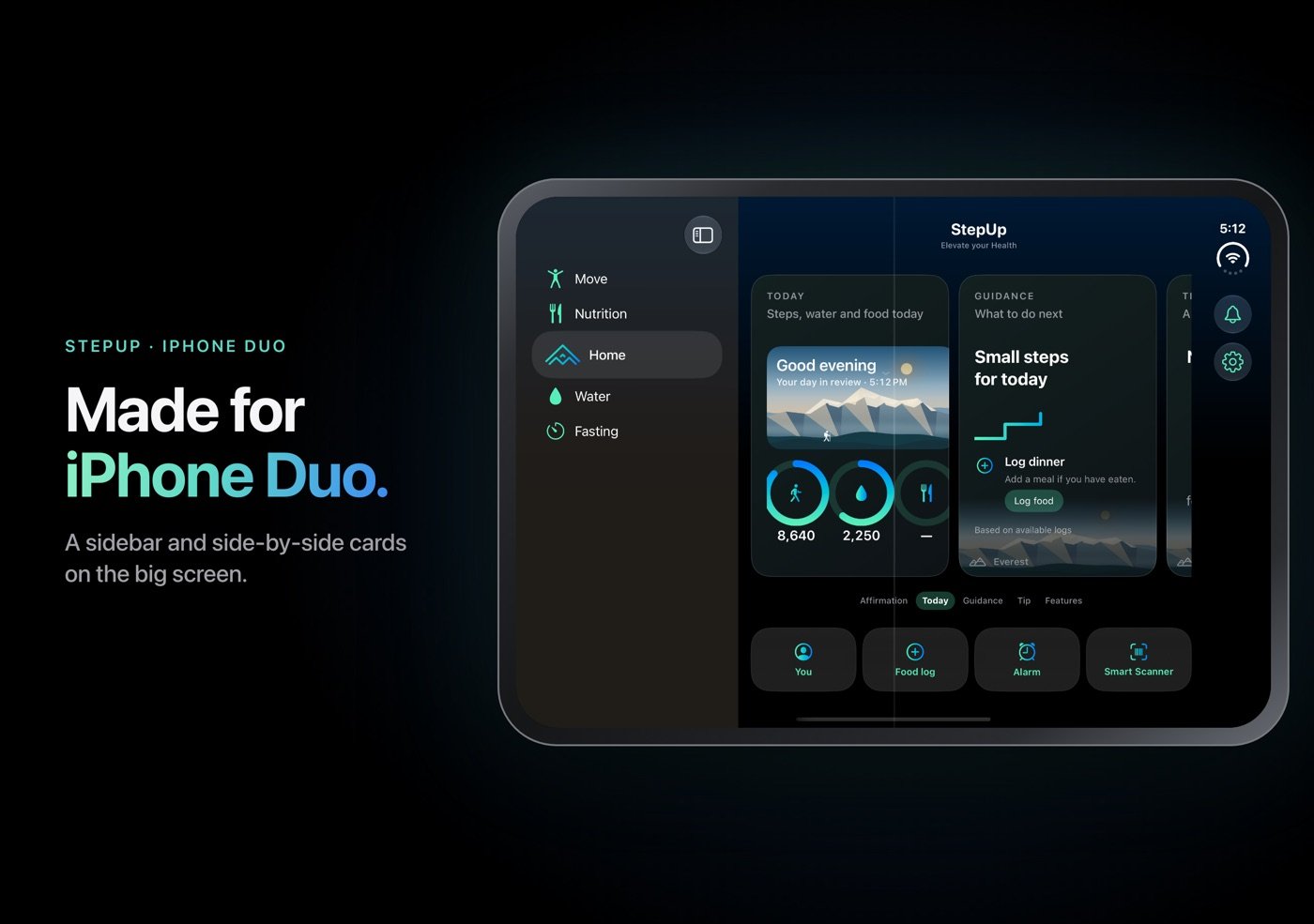
- Made for iPhone DuoOpen your iPhone Duo for a sidebar and side-by-side cards. Stand it up half-open and Nightstand appears with your next alarm.
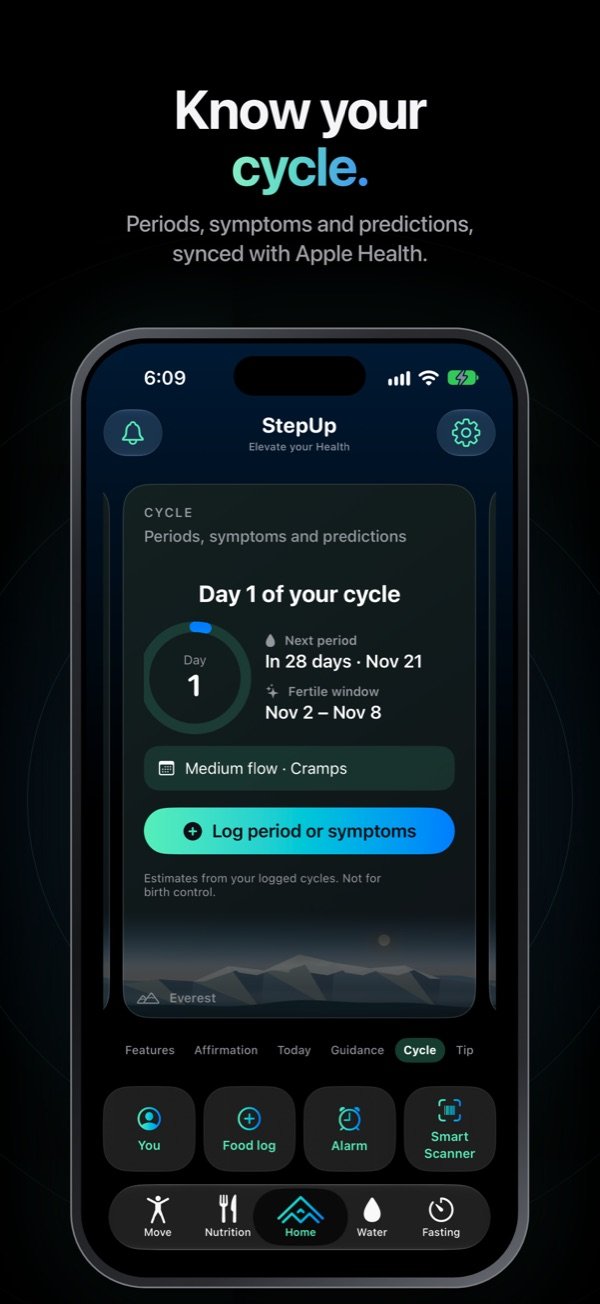
- Cycle trackingA Cycle card shows your cycle day, next period and fertile window, synced with Apple Health. Log periods and symptoms, and set reminders.
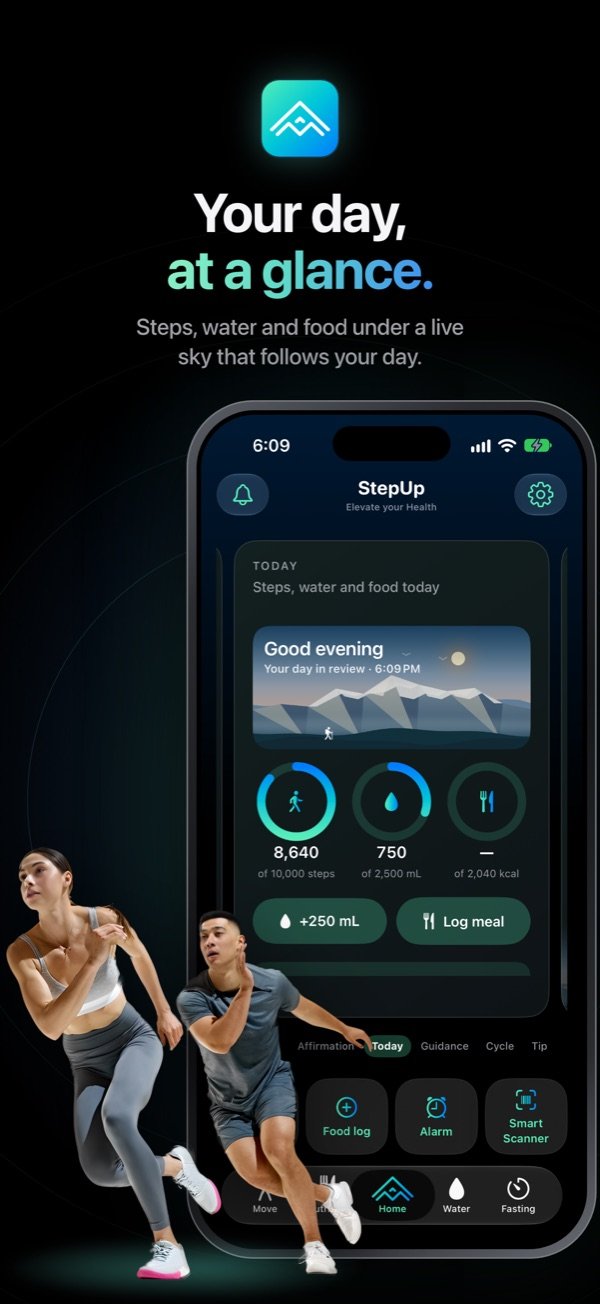
- Today, at a glanceSteps, water and food rings under a live sky that follows the time of day, with quick buttons to add water or log a meal.
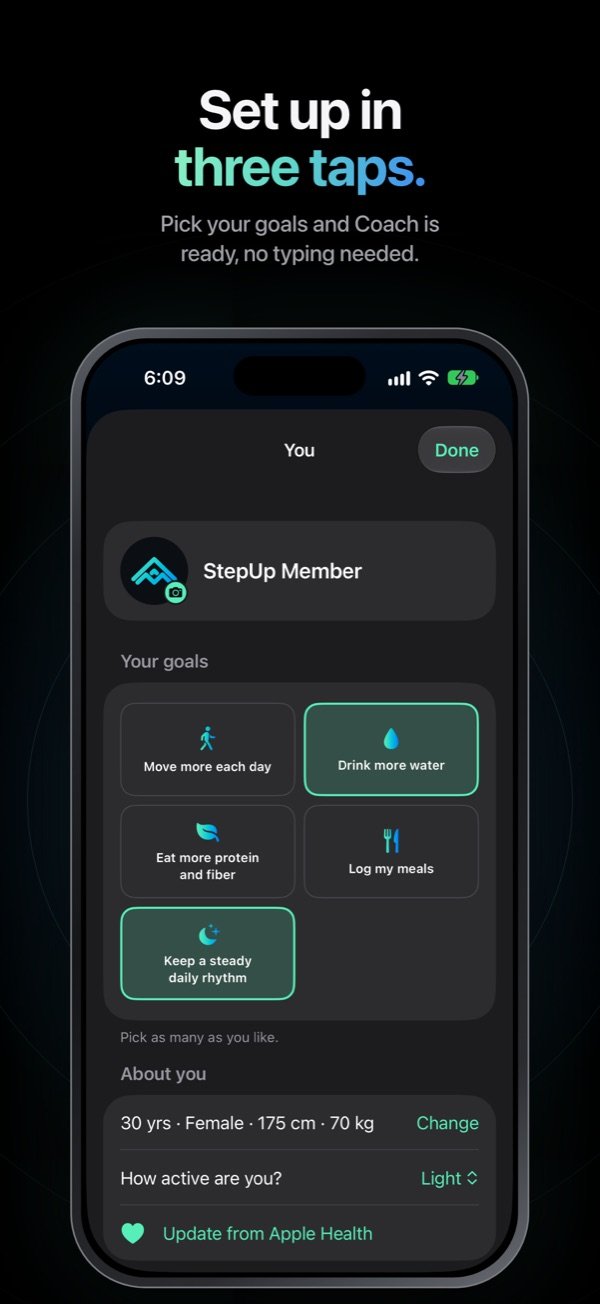
- Set up in three tapsSync with Apple Health, pick one or more goals, and you are ready. No typing needed.
- Alarm and NightstandRhythm is now Alarm, and your next alarm time shows on the clock and in Nightstand.
- Black, alwaysStepUp keeps its dark look whatever your iPhone’s appearance, and widgets have a solid dark background that reads well on any wallpaper or Home Screen style.
A look inside
Swipe through the screens. Home sits in the middle of five tabs, with Move and Nutrition on one side and Water and Fasting on the other.


Home
Today is your main card: steps, water and food rings under a live sky, with Guidance on what to do next, a tip for your goals and a daily affirmation. Quick buttons open You, the food log, Alarm and the Smart Buy Scanner.
Move
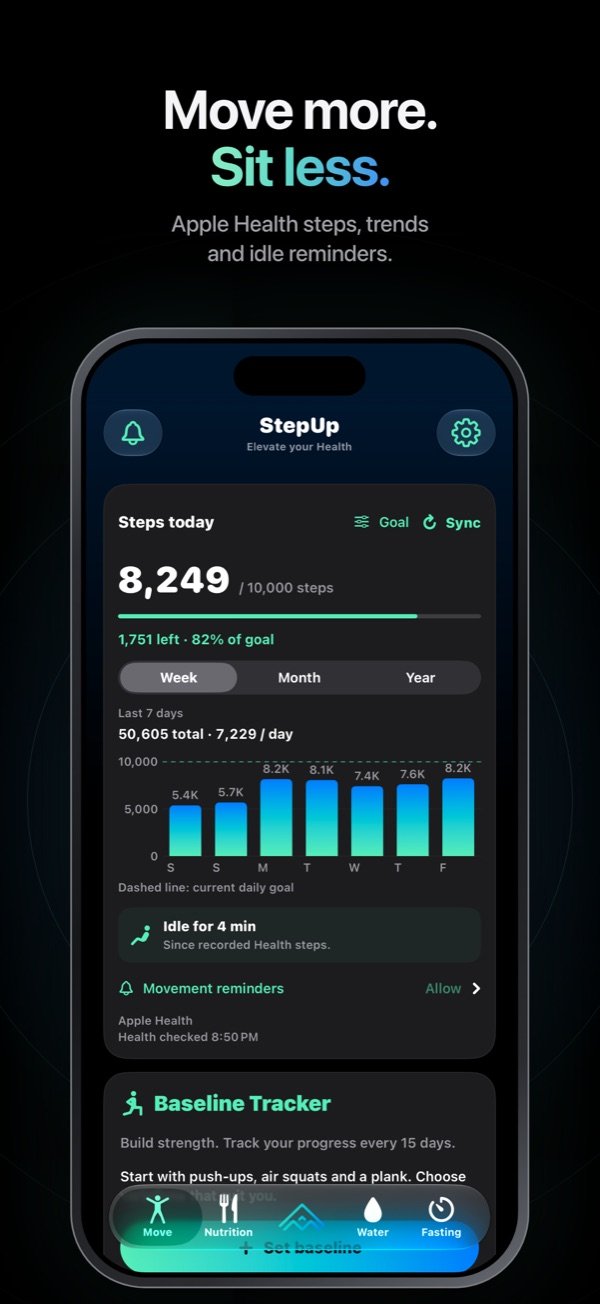
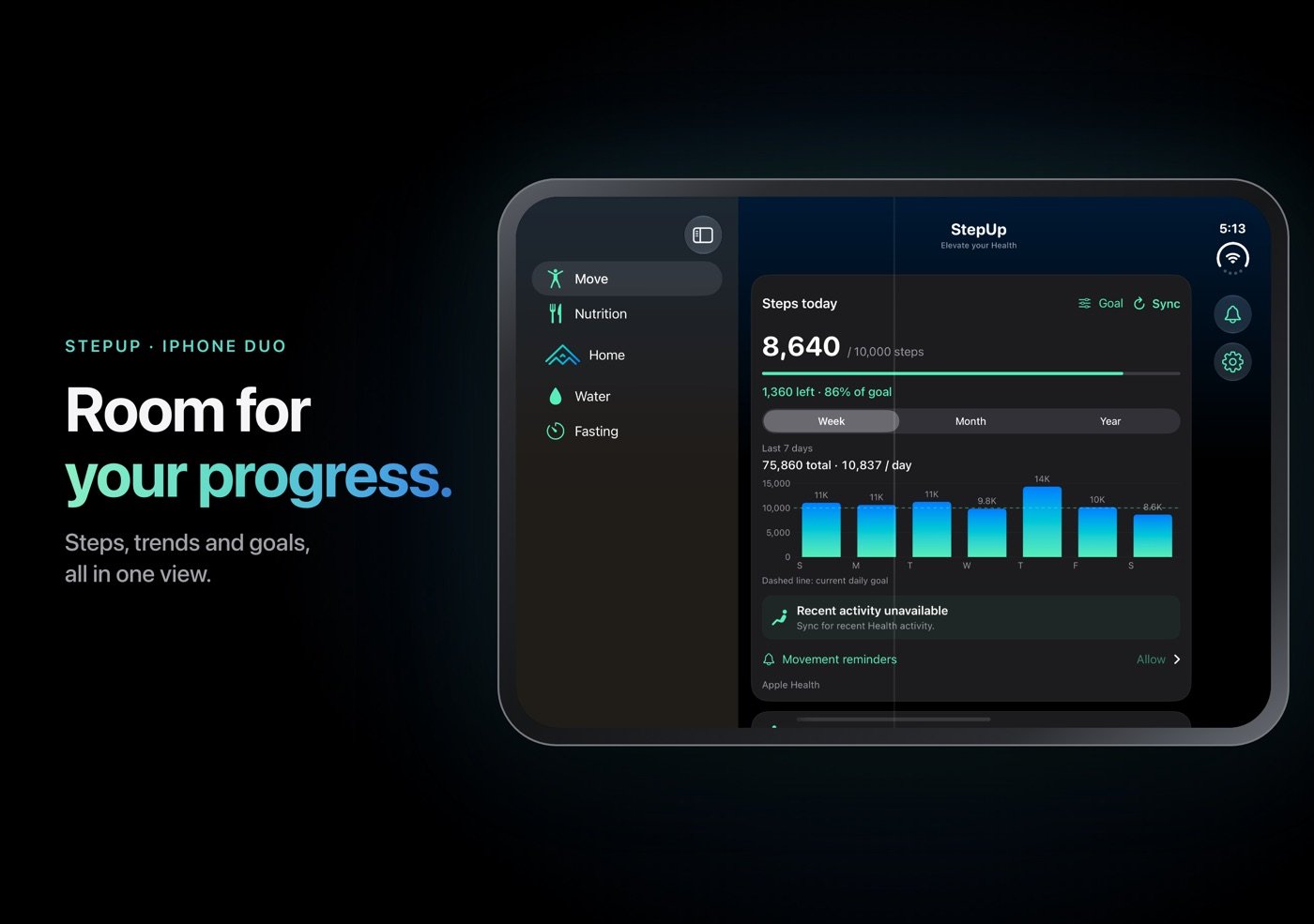
Steps from Apple Health with a daily goal and weekly, monthly and yearly trends. Optional reminders when you have been still for a while, and a Baseline Tracker for push-ups, air squats and planks every 15 days.
Nutrition
Search for foods, scan a barcode or add a meal by hand. Track calories, protein, carbohydrates, fat and fiber against goals you can edit. On supported devices, a meal photo can suggest foods for you to review before logging.
Water
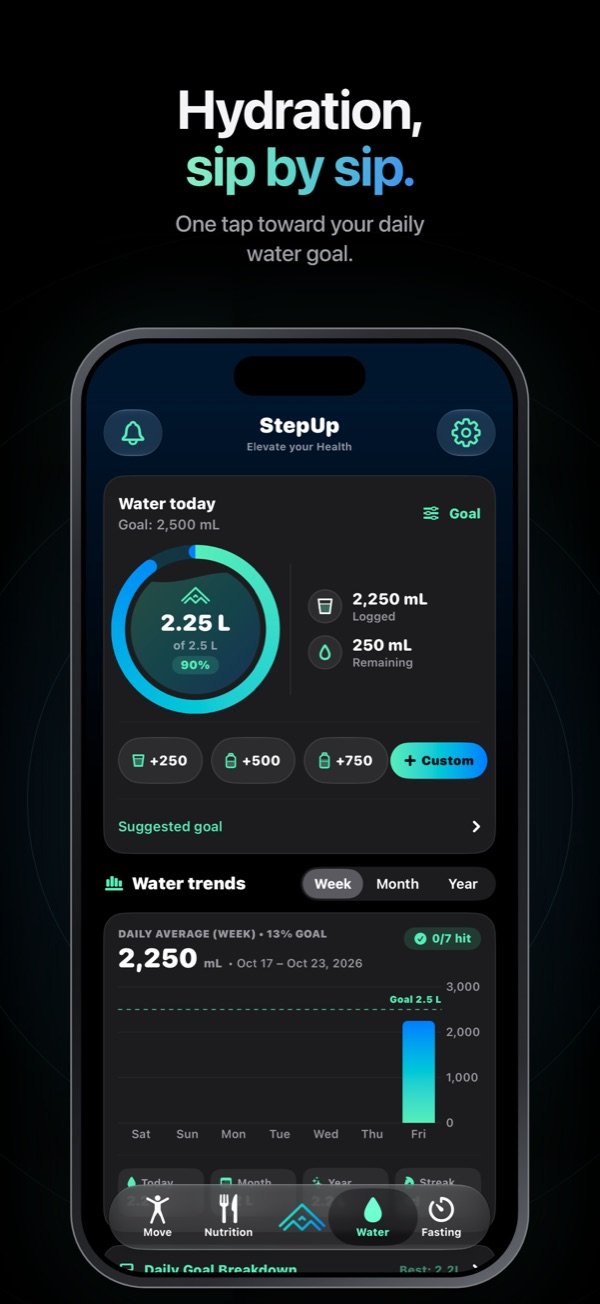
Log water with quick-add buttons or a custom amount, follow a suggested daily goal you can change, and see your weekly and monthly trends.
Fasting
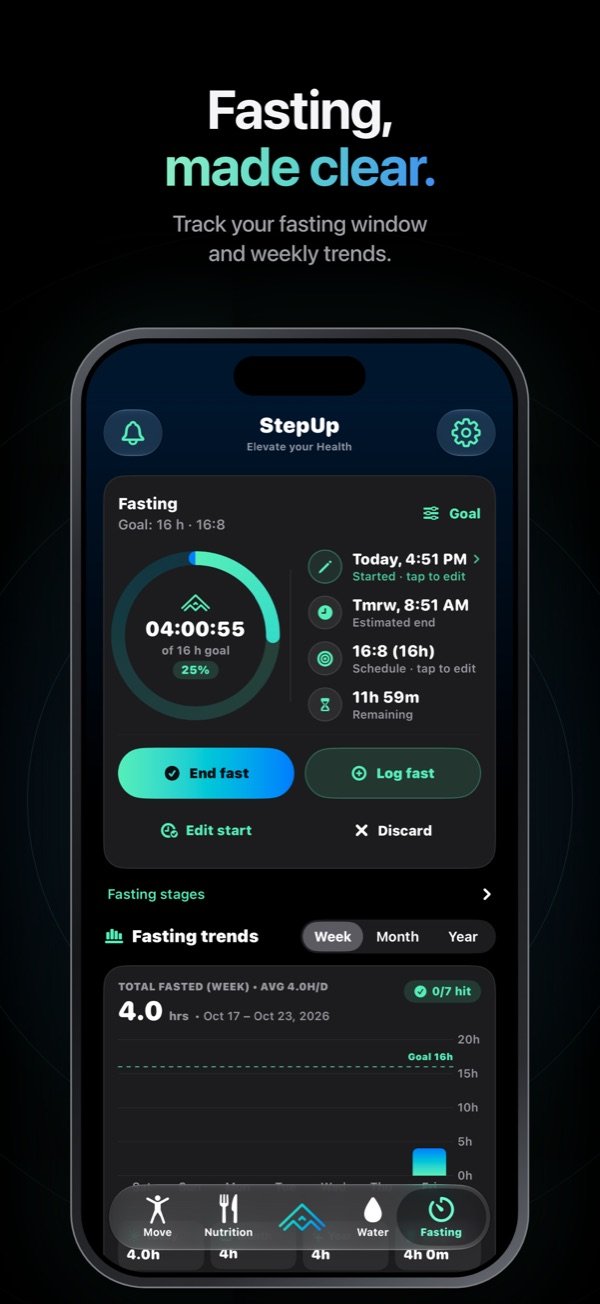
Track your chosen fasting window, see when it ends, edit the start time, and follow your weekly fasting trends.
Alarm
Wake and wind down with a calm alarm and a Nightstand clock that shows a new mountain peak each day and your next alarm time. Alarms need iOS 26 or later.
Cycle tracking
For profiles set to Female: your cycle day, next period and fertile window, from the periods you log or Apple Health. Log flow and symptoms, and get reminders before your period. Predictions are estimates, not medical advice, and not for birth control.
You
One page for your goals, body details and daily targets. Targets are set from your profile, and changes save as you make them.
Smart Buy Scanner
Scan a packaged food to explore its ingredients and nutrition from Open Food Facts, a worldwide open database. Coverage varies by country and brand.
Reminders
Set movement, water, meal and custom reminders to fit your day, with quiet hours when you do not want to be disturbed.
Made for iPhone Duo
Open your iPhone Duo and StepUp fills the big screen: a sidebar with Move, Nutrition, Home, Water and Fasting, and Home cards side by side. Stand it up half-open, like a tent, and Nightstand appears. The Live Activity fits the iPhone Duo’s tall Dynamic Island.


Your day at a glance
Home Screen widgets
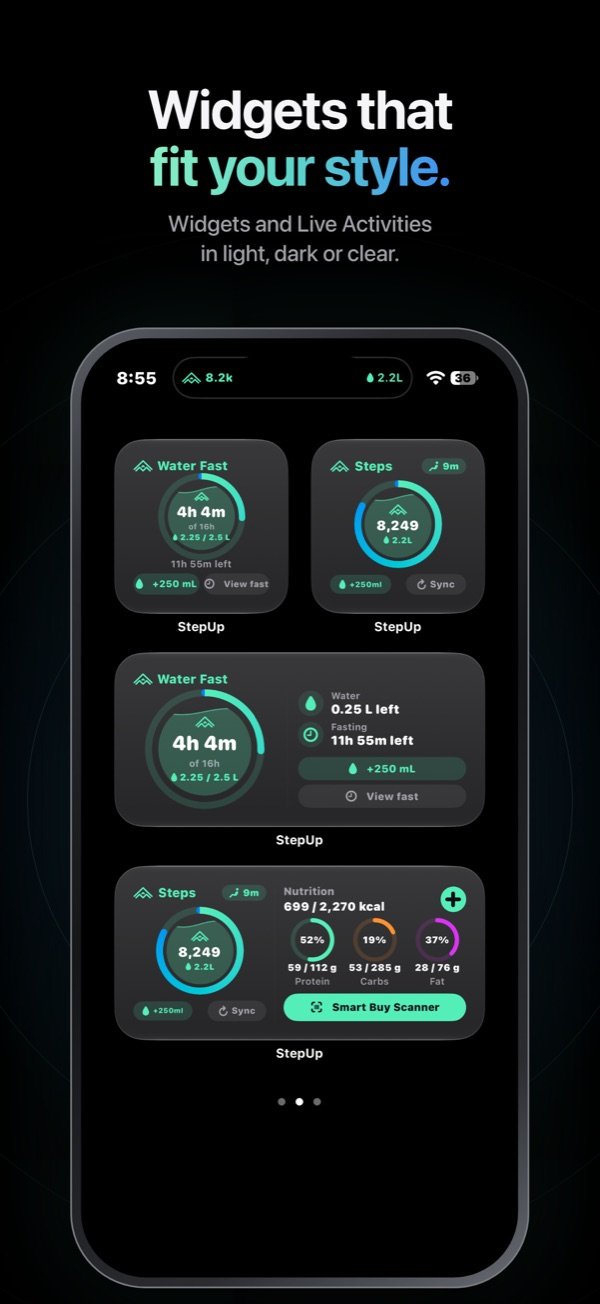
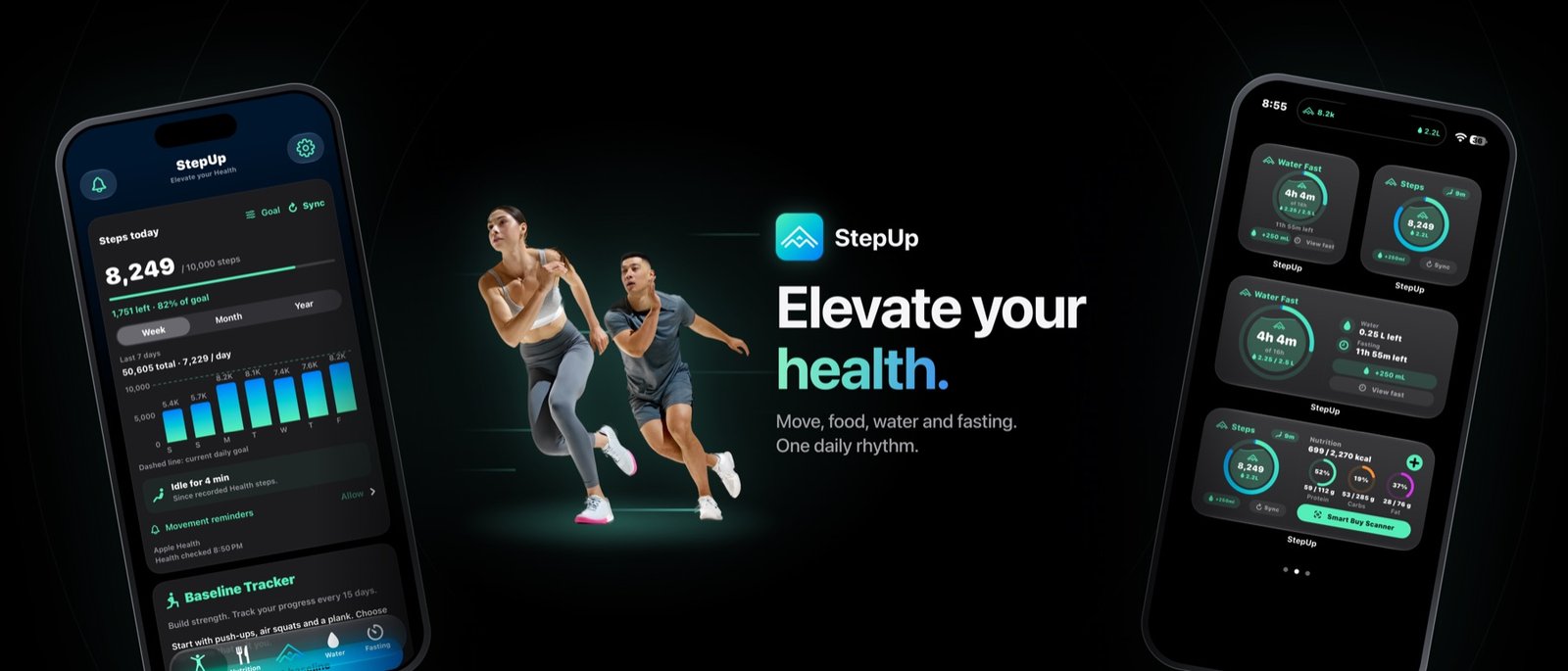
Water and fasting, steps, nutrient rings, progress bars, a compact bar, Meal Logger and Smart Buy Scanner, in small, medium and large sizes. Buttons let you add water, sync steps or open the food log without opening the app first. Widgets use a solid dark background that reads well on any wallpaper, including Clear and Tinted Home Screen styles.
Lock Screen and Live Activities
Keep steps, water, fasting and nutrition on your Lock Screen and in the Dynamic Island, and pause them during your quiet hours.
Apple Watch
See today’s steps against your goal on your wrist, and add StepUp complications to your watch face.
Make it yours
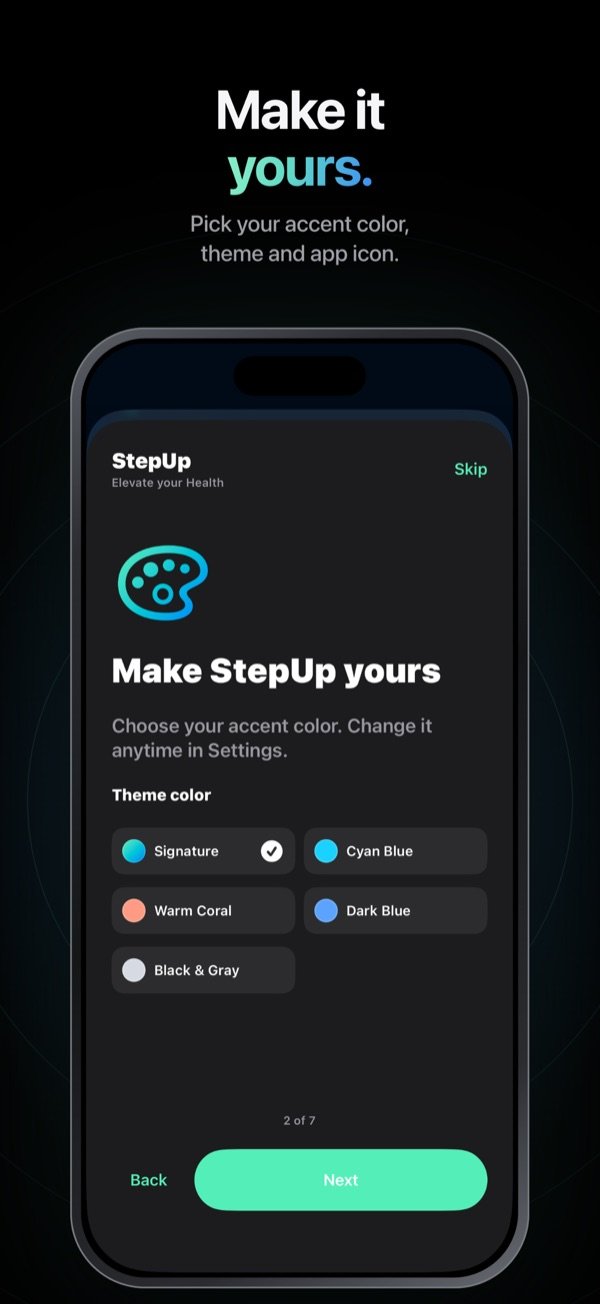
- Accent colorsPick Signature, Cyan Blue, Warm Coral, Dark Blue or Black & Gray. The app and its widgets change together.
- Themes and app iconsChoose a theme and an app icon style for your Home Screen.
- PeaksChoose the mountain peaks that appear on Home and in Alarm.
- GoalsPick one or more goals with a tap. Daily step, water, food and fasting targets start from your profile, and you can change each one in its tab.
- Reminders and quiet hoursTurn each reminder on or off and set the hours when StepUp stays quiet.
- Backup & RestoreCreate a password-protected backup file and keep it wherever you choose, such as AirDrop to a Mac or a folder on your computer. Restore it on a fresh install of StepUp. StepUp never uploads your backups, and it cannot recover a lost password.
StepUp Privacy Policy
Data the app uses on your device
- Apple Health. With your permission, StepUp can read steps, walking and running distance, active energy, exercise minutes, workouts, weight, height, date of birth, biological sex, and dietary energy, macronutrients and fiber. If you use cycle tracking, it can also read menstrual flow, spotting and symptoms (abdominal cramps, acne, bloating, breast pain, fatigue, headache, lower back pain and mood changes). These power your activity screens, goals and calorie estimates, weight trends, daily summaries and cycle predictions. You choose which permissions to give, and a feature may be limited if its data is not available.
- Writing to Apple Health. With your permission, StepUp can save the meals and weights you log to Apple Health. When you choose to save a completed workout, StepUp writes its type and duration. If you use cycle tracking, StepUp saves the periods, spotting and symptoms you log. It does not create calorie or heart-rate samples.
- What you enter. Your profile and goals, meals, water, fasting sessions, workouts and baselines, period and symptom logs, reminders, alarm settings, theme and an optional profile photo.
- Camera and photos. If you allow it, the camera is used to scan barcodes and to take meal photos. On supported devices, a meal photo is used to suggest food names, and the photo is processed on your device. It is not sent to us or to the food databases. You can keep a small thumbnail of the meal on your device; the original photo and its location are not stored with the meal.
This data is stored on your device. It is shared between the StepUp app, its widgets and its Apple Watch app on your own devices so they show the same information. It is not sent to us.
Online food lookups
Food searches send the words you type to USDA FoodData Central. Barcode scans and the Smart Buy Scanner send the barcode number or product category to Open Food Facts, and product images load from the image hosts those results name. Like any website, these services receive standard request information such as your IP address and the time of the request. StepUp does not attach your Health data, profile, meal diary or any account identifier to these requests. Please do not type personal information into the food search. These services have their own policies: Open Food Facts and USDA National Agricultural Library. Manual food entry and the built-in food tables work without an online lookup.
Apple Health data
StepUp uses Health data only to provide its features to you. Health data is never sold, never used for advertising, marketing or data mining, never disclosed to third parties, and never stored in iCloud by StepUp. Cycle predictions, such as your next period and fertile window, are calculated on your device from the periods you log. They are estimates, are not medical advice, and should not be used for birth control.
Backups
Backup & Restore creates a password-protected, encrypted file on your device. You decide where it goes, for example AirDrop or a folder on your computer. StepUp does not upload backups anywhere, and we cannot see them or recover their password.
What we do not do
- No accounts or sign-in
- No analytics, tracking or advertising, and no third-party code that does these things
- No location data
- No selling or sharing of your data
How long data is kept
We keep no data, because none is sent to us. The data on your device stays there until you delete it in the app or delete the app. StepUp keeps a small cache of product information you have looked up, which is cleared with your other records.
Notifications
If you allow notifications, reminders and alarms are scheduled on your device. No notification data is sent to us.
Your choices
- To change what StepUp can read or write in Health, open the Settings app, then Health, then Data Access & Devices, then StepUp.
- To delete everything StepUp has stored, use Delete All Local Data in StepUp’s Settings, or delete the app. This does not delete records already saved in Apple Health, which you manage in the Health app.
Children
StepUp does not collect personal information from anyone, including children.
Your rights
Depending on where you live, you may have rights to access, correct or delete personal data about you. Because StepUp sends us no data, we hold none to access or delete. You control everything the app stores on your device, as described above.
Changes
If this policy changes, we will update it on this page and change the date above.
Contact
Questions about privacy: hello@stepuphealth.org. If you email us, we use your message only to reply to you.
Support
Need help with StepUp, found a bug, or have an idea? Email hello@stepuphealth.org or use our contact form. Please include your iPhone model and iOS version if you are reporting a problem.
Frequently asked questions
My steps are not showing or look out of date.
Open the Settings app, go to Health, then Data Access & Devices, then StepUp, and make sure Steps is turned on. Then open StepUp and tap Sync on the Move tab. StepUp shows the same steps as the Health app, so if Health has not received steps from your iPhone or Apple Watch yet, StepUp will catch up when it does.
Why are my widget numbers different from the app?
iOS decides how often widgets refresh. Tap Sync on the widget or open the app to update it.
How do I add the widgets or the Apple Watch app?
For widgets, touch and hold your Home Screen, tap Edit, then Add Widget, and search for StepUp. For Apple Watch, open the Watch app on your iPhone and install StepUp from the list of available apps.
Why can’t I find the Alarm or photo food suggestions?
Alarms need iOS 26 or later. Photo food suggestions need iOS 27 or later on a compatible device. Everything else works from iOS 17.
A food or barcode is missing or looks wrong.
Food search uses USDA FoodData Central and barcodes use Open Food Facts, so coverage varies by country and brand. Nutrition values are estimates. You can always add a food by hand.
How do I move StepUp to a new iPhone?
On your old iPhone, open Settings in StepUp, choose Backup & Restore and create a backup with a password. Send the file to your new iPhone, for example with AirDrop. Install StepUp on the new iPhone and restore the file before adding any records. Then check your Health permissions and confirm your alarm. Keep the file and its password until you have checked the restored records.
How is my water or calorie goal suggested?
StepUp suggests goals from the details you enter and general published guidance. They are estimates, not advice, and you can set any goal you like.
How does StepUp work on iPhone Duo?
Open your iPhone Duo to see a sidebar and two Home cards side by side. Stand it up half-open, like a tent, to open Nightstand. You can turn this off with Nightstand in tent mode on the Alarm screen.
Who sees the Cycle card, and where does its data come from?
The Cycle card appears when your profile is set to Female. It reads periods, spotting and symptoms from Apple Health if you allow it, and adds what you log in StepUp. You can hide it in Coach settings. Predictions are estimates and should not be used for birth control.
Is StepUp free? Do I need an account?
Yes, StepUp is free, with no ads, and there is no account or sign-in.
How do I delete my data?
Use Delete All Local Data in StepUp’s Settings, or delete the app. We hold no copy of your data. Records saved to Apple Health stay there until you delete them in the Health app.
Terms of use
StepUp is provided under Apple’s Standard End User License Agreement. Product data is supplied by Open Food Facts under the Open Database License, and food data by USDA FoodData Central.
Health note. StepUp supports general wellness and does not provide medical advice, diagnosis or treatment. Goals, nutrition values and calorie targets are estimates and may be incomplete or inaccurate. Fasting may not be appropriate for everyone. Talk to a doctor or qualified health professional before making major changes to your eating, fasting or exercise, especially if you are pregnant, have diabetes or another health condition, or take medication.
Apple, Apple Watch, iPhone, App Store and Apple Health are trademarks of Apple Inc., registered in the U.S. and other countries and regions.